ExaSearchBot and ExaUser explained: what Exa's crawlers do and whether to allow them
ExaSearchBot builds Exa's index and ExaUser fetches pages live for AI agents. What each bot does, how robots.txt treats it, and how to track both in your logs.
If you read your raw server logs, you may have run into two names that are less familiar than GPTBot or PerplexityBot: ExaSearchBot and ExaUser. The user agents point to subdomains of exa.ai and not much else. So the questions are fair ones. What are these bots, should you let them in, and does any of it change whether AI tools cite you?
The short answer is that both belong to Exa, they do different jobs, and robots.txt treats them differently. ExaSearchBot decides whether your pages can be found through Exa. ExaUser is what you see when an agent is reading one of your pages right now. Most sites should allow both. Before you decide, though, check how your current robots.txt applies to them, because the default behavior has a catch that is easy to miss even in a carefully written file.
What Exa is
Exa describes itself as a search engine built for AI applications. It doesn't serve a results page to people. It offers a search and retrieval API that AI agents and apps call when they need to find and read web pages. Promptwatch's changelog calls it the search engine many AI agents and apps use to find and read web pages.
That makes Exa a layer you rarely see directly. Someone asks an agent a question, the agent calls Exa to find sources, and Exa either returns pages from its index or fetches a page fresh. Promptwatch's own model list gives one concrete case: the OpenCode coding agent searches the web through Exa. If a tool like that recommends your library or quotes your docs, Exa is the route it took to reach your page.
Those two steps, searching the index and fetching a page, are handled by two separate bots.
ExaSearchBot builds the index
ExaSearchBot is the crawler behind Exa's index. Exa documents its user agent as Mozilla/5.0 (compatible; ExaSearchBot/1.0; +https://crawler.exa.ai/), with ExaSearchBot as the robots.txt token. It crawls on its own, discovers public pages, and stores them so the API can return them later.
Exa says it follows the Robots Exclusion Protocol, limits request rates per site, and does not try to get past logins, paywalls, or CAPTCHAs.
What follows from that is simple. A page ExaSearchBot has never fetched cannot be returned by Exa. Promptwatch's ExaSearchBot page puts it bluntly: blocking it removes you from every agent that searches through Exa.
One detail gets missed often. robots.txt controls crawling, not indexing. If a page is already in Exa's index and you want it gone, a Disallow rule will not remove it. Serve a noindex robots meta tag or an X-Robots-Tag: noindex header, leave the page crawlable, and let ExaSearchBot fetch it again. Exa drops the page after that re-fetch.
ExaUser fetches one page on request
ExaUser is the live fetcher. Exa's documentation says it runs when a person, or an application built on the Exa API, asks for the current content of a specific page. Its user agent is Mozilla/5.0 (compatible; ExaUser/1.0; +https://exauser.crawler.exa.ai).
According to Exa, ExaUser does not crawl the web automatically. It is also not used to decide whether content may appear in Exa search. It reads public content only, doesn't get around logins, paywalls, or CAPTCHAs, and submits no forms.
Promptwatch's bot page describes a typical case as an illustration: an agent built on the Exa API fetches the current version of a pricing page so it can quote today's numbers. So when ExaUser requests cluster on a single article, that usually means a person or an app wanted that particular page read.
How robots.txt applies to each bot
This is where the two bots part ways.
| ExaSearchBot | ExaUser | |
|---|---|---|
| Job | Builds Exa's search index | Fetches one page live for a user or app |
| Follows robots.txt | Yes, per Exa | May not, because a person or app starts each fetch |
| What a Disallow rule does | Stops crawling for the index | Does not opt you out of Exa search |
| How to block it | A robots.txt group for ExaSearchBot | A signature check and a rule at your CDN or WAF |
| Name in Promptwatch | Exa Search Bot, counted as an AI crawl | Exa Citations, counted as a citation crawl |
Exa says plainly that a robots.txt rule for ExaUser does not work as a search opt-out. If your goal is to keep pages out of Exa search, the rule has to target ExaSearchBot. If your goal is to stop agents reading a page live, robots.txt is not a reliable tool for that. The dependable route is to verify the request's signature, which Exa documents below, and block at the edge.
The catch: ExaSearchBot falls back to your search engine rules
Here is the part that surprises people. When your robots.txt has no group for ExaSearchBot, the bot does not drop straight to your User-agent: * group. Exa says it looks for a group addressed to ExaSearchBot first, then follows the rules set for major search engines, and only after that the * group. Promptwatch's changelog is more specific: without its own group, ExaSearchBot follows your Googlebot and Bingbot rules instead of your default.
That turns a few common setups upside down. Say you wrote a strict default to keep unknown crawlers out, with an open group for Google:
User-agent: *
Disallow: /

User-agent: Googlebot
Allow: /
You might expect Exa to be locked out. It isn't. ExaSearchBot reads the Googlebot group and crawls the whole site.
The reverse happens too. If your Googlebot group blocks internal search results or parameter URLs and your default group is wide open, ExaSearchBot inherits those Googlebot restrictions, not your default.
Neither source says what ExaSearchBot does when your Googlebot and Bingbot groups disagree with each other. Don't leave that to chance. Write an explicit group:
User-agent: ExaSearchBot
Allow: /
Disallow: /private/
Promptwatch's bot page notes that a group naming ExaSearchBot takes precedence over your rules for other search engines, so this is the one way to know what it will do. If you build your file with Promptwatch's free robots.txt generator for AI, it now writes an ExaSearchBot group whenever you add rules for search engines, which closes the gap for you.
Telling real Exa traffic from fakes
User agent strings are easy to fake. For most AI crawlers the usual check is to match the request IP against the operator's published IP ranges. Promptwatch's Agent Analytics does exactly that for bots like GPTBot, ClaudeBot, and PerplexityBot, which is how spoofed requests get filtered out. Exa publishes no IP ranges, so that check can't be done for its bots. That is why neither Exa bot gets a Verified badge in Promptwatch.
Exa uses signatures instead. Every request from both bots is signed with HTTP Message Signatures (RFC 9421), following the Web Bot Auth scheme, and carries Signature, Signature-Input, and Signature-Agent headers. The public keys are published here:
- ExaSearchBot:
https://crawler.exa.ai/.well-known/http-message-signatures-directory - ExaUser:
https://exauser.crawler.exa.ai/.well-known/http-message-signatures-directory
Exa says Cloudflare, Akamai, and other providers that support Web Bot Auth validate these signatures automatically. If your CDN does, you have a dependable way to separate real Exa requests from anything borrowing the name. And if you ever need to block ExaUser, the signature check is what that edge rule should be built on, not the user agent string.
Should you allow them?
For most sites, yes, both of them.
ExaSearchBot decides whether your pages can be found through Exa at all. If you want to appear in agents and apps that search through it, keep it allowed and use a dedicated group for the few folders you want kept out.
ExaUser is harder to argue against. Its requests come from people and agents that want to read one specific page. Promptwatch's ExaUser page notes that blocking it mostly stops on-demand retrieval of fresh page text, so those agents answer from other sources instead. In practice that means somebody else's page gets read and cited in your place.
There are real exceptions: licensed content, sections under legal review, pages you would rather no automated reader touched. Handle the index side of that in robots.txt and the live-fetch side at the edge, because one tool cannot do both jobs.
A check you can run this week
- Open your live robots.txt and look for an ExaSearchBot group. If there isn't one, read your Googlebot and Bingbot groups carefully, because those are the rules ExaSearchBot follows today.
- Decide per bot. Write an explicit ExaSearchBot group that matches what you want indexed, then decide separately whether ExaUser needs any rule at your CDN.
- If your CDN supports Web Bot Auth, confirm it is validating Exa's signatures.
- Find out which pages Exa actually requests, and watch index crawls and live fetches as two separate lines over the following weeks.
The last step is where log data earns its keep. A page with ExaSearchBot visits and no ExaUser fetches has been collected but isn't being read for answers, which points at content or prompt fit. A page that never gets an ExaSearchBot visit has an access problem, and rewriting it won't help until the crawler can reach it.
Tracking Exa in Promptwatch
Since November 6, 2026, Promptwatch tracks both Exa bots in its crawler logs, part of Agent Analytics. Exa Search Bot builds the index and counts as an AI crawl. Exa Citations is the ExaUser live fetch and counts as a citation crawl. Both show up in the AI crawlers filter, the charts, and the logs table with Exa's icon, next to the OpenAI, Anthropic, Perplexity, and Meta bots you already track.
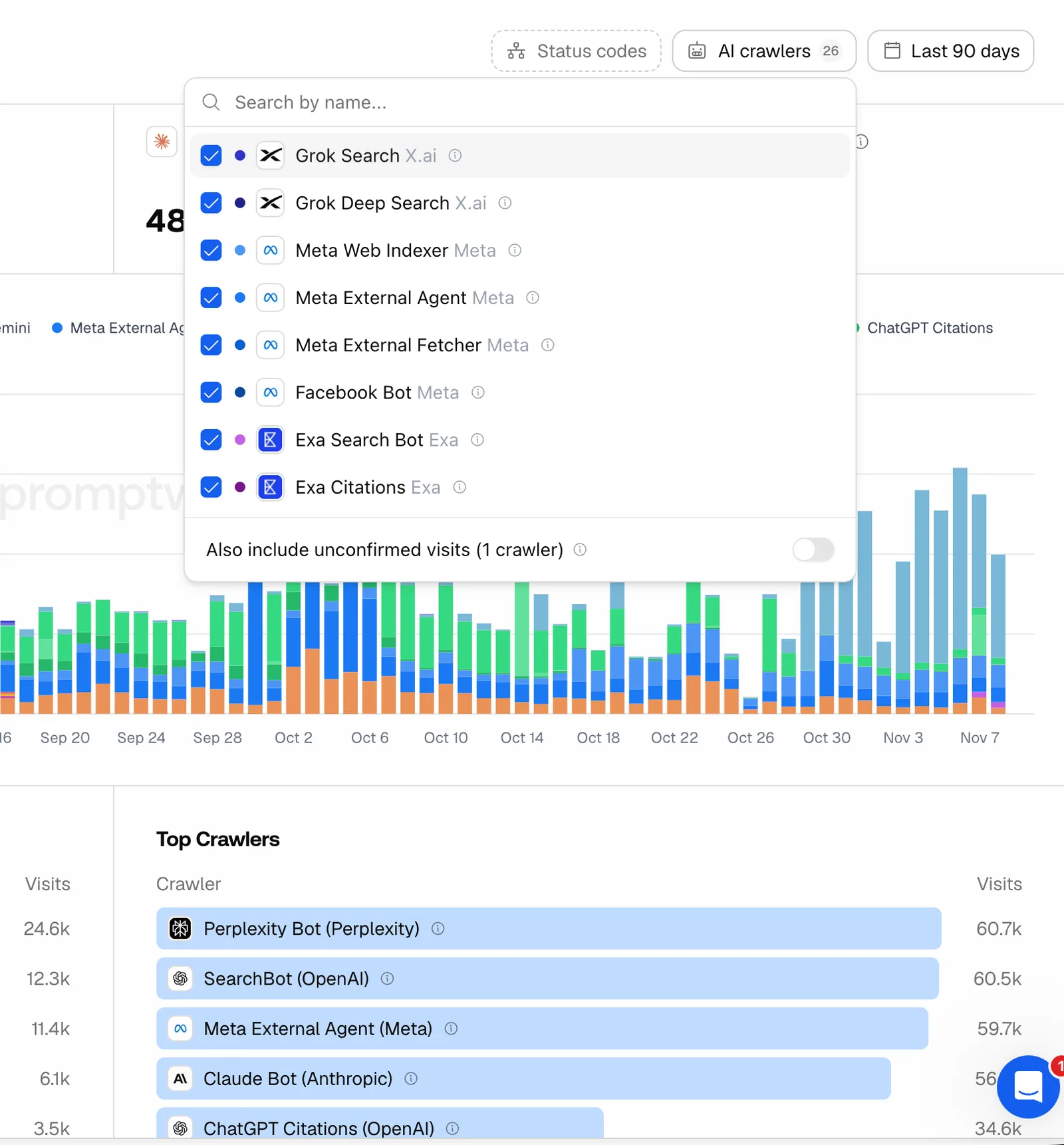 Promptwatch Crawler Logs AI crawlers filter with Exa's bots, from the Promptwatch changelog (November 6, 2026). Example project data.
The split matches how Promptwatch has classified bots since November 4. Search indexers such as OAI-SearchBot and Meta-WebIndexer count as AI crawls, and citation crawls are only the bots that fetch a page while answering a user, like ChatGPT-User. Exa slots into the same two buckets you already read for OpenAI.
The rest of Agent Analytics is what makes this useful beyond a bot count. The crawl-to-citation path shows a citation rate per page, which tells an access problem from a content problem. Error tracking explains failed fetches. A Host column, added November 13, warns you about requests from hostnames that aren't your project website. Filter to the two Exa bots, stack a path filter on your docs or pricing folder, and you can see whether Exa is indexing those pages and whether agents are coming back to read them.
Most tools in our directory track prompts and stop there, so they can't show you any of this. That is the main reason we would look at Promptwatch first for crawler questions. On brand plans, crawler logs start on Professional ($245 a month); Essential doesn't include them. Every agency plan includes them.
Next step
If ExaSearchBot and ExaUser already appear in your raw logs, connect those logs to Promptwatch and look at them per page. Start the 7-day free trial on the Professional plan from the Promptwatch pricing page, then filter Crawler Logs to Exa Search Bot and Exa Citations.